Problem signature:
Problem Event Name: BlueScreen
OS Version: 6.0.6000.2.0.0.256.1
Locale ID: 1033
Additional information about the problem:
BCCode: 1e
BCP1: FFFFFFFFC000001D
BCP2: FFFFF98005BD13C9
BCP3: 0000000000000002
BCP4: 5000E26EDCA30000
OS Version: 6_0_6000
Service Pack: 0_0
Product: 256_1
Files that help describe the problem:
C:\Windows\Minidump\Mini013110-02.dmp
C:\Users\xavier\AppData\Local\Temp\WER-46503-0.sysdata.xml
C:\Users\xavier\AppData\Local\Temp\WERC956.tmp.version.txt
Read our privacy statement:
http://go.microsoft.com/fwlink/?linkid=50163&clcid=0x0409
Saturday, January 30, 2010

Wednesday, June 17, 2009
Seagate Barracuda 7200.11 / ES.2 / DiamondMax 22 drive issue - Company issues major firmware updates
Seagate Barracuda 7200.11 / ES.2 / DiamondMax 22 drive issue - Company issues major firmware updates
January 19th, 2009

Alarming news for all Seagate Barracuda 7200.11 / ES.2 / DiamondMax 22, hard drive users as a company statement confirms the potential flaw in the firmware of their brand new Barracuda 7200.11 / ES.2 / DiamondMax 22 drives.
In last few weeks there were lots of web reports from around the world suggesting that the new 7200.11 drives are failing at a alarming rate, which is now confirmed in the company web bulletin released yesterday.
Which seagate drives are faulty and effected in this firmware problem ?
Seagate Barracuda 7200.11
ST31000340AS
ST3750330AS
ST3640330AS
ST3500320AS
ST31500341AS
ST31000333AS
ST3640323AS
ST3640623AS
ST3320613AS
ST3320813AS
ST3160813AS
Seagate Barracuda ES.2 SATA DiamondMax 22
ST31000340NS
ST3750330NS
ST3500320NS
ST3250310NS
Seagate DiamondMax 22
STM31000340AS
STM3750330AS
STM3500320AS
STM31000334AS
STM3320614AS
STM3160813AS
STM31000333AS
What is wrong with these drives ?
Well here the official version,
Welcome, Seagate hard drive owners. A number of Seagate hard drives from the following families may become inaccessible when the host system is powered on:
Barracuda 7200.11
DiamondMax 22
Barracuda ES.2 SATAOnce a drive has become affected the data becomes inaccessible to users but the data is not deleted. Seagate has isolated this issue to a firmware bug affecting drives from these families manufactured in December 2008.
Now to explain, please note there is nothing wrong in the hardware of these products. The software in side it (which is called firmware) is what locking the drives some time. It is not causing any bad sector or disk damage, all it is doing is simply locking the disk as a fail safe process.
How do you fix these effected Seagate drives ?
By simply replacing the firmware with a working one. Please follow the links given above to download the correct firmware for your drive.
How do you find your hard disk drives model number ?

Download the Seagate software, drive detect and run it. It should show you the model number.
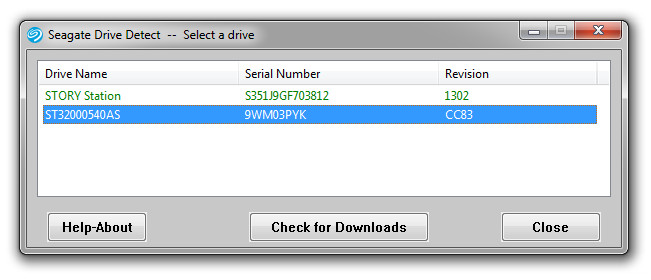
Once you know your model number, you can obtain the right firmware for your self.
How do I upgrade firmware for my Seagate drive ?
The firmware comes as an ISO file. ISO is a CD image hence you would need a blank CD and a software which can burn a bootable ISO in a CD.
Ref -> Seagate KB
In other-words you can use NERO to burn the image to a blank CD.
Once you are done with burning, please boot using the CD by configuring your system to boot from CD / DVD room (which can be done from BIOS) and follow the on screen information to flash the firmware.
Note ->
- It is very imp that you backup your data from the drive, in which you are about to perform the firmware upgrade.
- Do not turn off the power while you are flashing the firmware of the device.
Tuesday, June 16, 2009
Seagate Fail part two: firmware fix breaks other drives
Seagate Fail part two: firmware fix breaks other drives
 Poor Seagate. Late last week, the news broke that their Barracuda 7200.11 1TB drives were failing en masse. Admirably, the company's already published a firmware fix, but maybe they pushed it out a little too fast because it's causing 500GB drive owners' discs to fail en masse.
The update has been taken offline for the moment, and users of 1TB and 750GB drives are reporting successful updates, but if you're on a 500GB drive and you've downloaded but not installed the update, then I certainly don't recommend doing so just yet.
source: http://www.techdigest.tv/2009/01/seagate_fail_pa.html
Seagate Firmware Update Causing Drives To Fail
| Seagate Firmware Update Causing Drives To Fail |  |  |  |
The updated firmware
Seagate issued to solve 1TB Barracuda drive faults is causing 500GB Barracuda drives to fail.
The origianl Issue.
Barracuda 7200.11 drives made in Thailand (ref: ST31000340AS with firmware level SD15) are failing at boot time with a firmware error that is said to lock the drive up and render it inoperable.
Seagate recently reduced its bare drive warranty period, raising some doubts about product quality standards.
A mail sent by Seagate to a North American reseller said:
Seagate Updates Warranty Terms on Select Bare Drives
Starting in 2009, Seagate will be making some important changes to its limited warranty terms for selected bare drive products.
For products purchased on or after January 3, 2009, the limited warranty period for consumer electronics, notebook and personal storage bare drives sold to Seagate Authorized Distributors will be changed from 5 to 3 years. Seagate believes that the new warranty period and terms better reflect current industry standards.
Seagate enterprise drives and Seagate and Maxtor external retail products that have 5-year warranty periods will not be affected by this change.
Seagate is very aware of this issue, has taken down the update and is investigating it currently. And I’m quite certain a fix for it will be posted in short order.
source:
http://www.pcrepairzone.com/services/seagate-firmware-update-causing-drives-to-fail.html
Maxtor STM31000340AS Data Recovery Information
Maxtor STM31000340AS Data Recovery Information

These are some real problems experienced by STM31000340AS and Maxtor hard drives in general that we see in our lab. We are not affiliated in any way with hard drive manufacturers. All the information below is based solely on our experience and we do not make any claims regarding reliability of the specific model. We see mostly failed drives in our lab and therefore we don't have complete statistics.
My drive Maxtor(model STM31000340AS) just crashed. It attempts to boot but clicks and then shuts down 2 times.
Ty H.
Hamilton, Ontario, Canada
Hamilton, Ontario, Canada
Maxtor hard drives are well-known for their firmware problems. Firmware of the drive is not located on the PCB as most people think. Main part of firmware is stored on the platter in so-called System(Service) Area. System Area occupies the negative cylinders, usually on the inner diameter and contains a number of firmware modules. If one of the modules becomes corrupted the whole hard drive micro-operating system can't boot up, the drive can't initialize correctly and stops working. If this situation occurs the drive becomes identified with its factory alias(N40P, CALYPSO, SABRE, GRIZZLY etc) quote often with 0 capacity. If you attempt to boot up from such drive or read any data from it you would get "Disk boot failure. Insert system disk and press enter" or "Primary Master Hard Disk Fail" or "No operating system found" or "USB Device malfunctioned" error or "S.M.A.R.T. Capable But Command Failed" or some other BIOS error.
Currently there is no way to fix this type of problem at home. It is not an easy "firmware flashing"; it is quite a complicated procedure and requires use of specialized expensive equipment and deep knowledge of hard drive design and data recovery technology. Luckily, it doesn't usually require opening the HDD in clean room and ordering donor drives, so data recovery in this case shouldn't be too expensive.
Upon starting just get a a repetitive tick-tock - pause - tick-tock noice, after some time the unit spins down. Unit was working and just gave this problem upon computer starting up one day. Powered unit in different positions, removed cover and saw head arm repeditly move from inner to outer of platters, no scrtaches, put in unit in freezer for 30min (had to try this), held onto heads arm while drive was running. Still no change.
Michael J.
Melbourne, Australia
Melbourne, Australia
Maxtors also well-known for their line of "musical" hard drives that have very high rate of bearings failures. When this occurs spindle gets stuck and motor voice coil starts producing nice futuristic cell phone melody or siren: . Data recovery in such case involves removing platters from such musical drive in class 100 clean room environment and transplanting them into matching donor. This complex and precise procedure requires a lot of experience and use of specialized in-house tools to maintain platters in alignment.
Another issue typical for Maxtor hard drives is damage to the components on the cirquit board(PCB). Maxtors are very vulnerable to overheating, power surges and bad power supply unit combined with power streak is usually enough to burn spindle motor controller chip on the logic board. Should this occur the computer would reboot itself, you would normally notice acrid smoke and smell coming from your PC and when powered on the drive would not spin up at all.
Another quite common symptom Maxtor drives have is clicking, knocking or beeping sound. The drive spins up and the head starts clicking right from the beginning with a regular constant sound: . Most often this a sign of bad heads, but before doing any clean room work, it is very important to perform accurate diagnostics and eliminate a chance of possible firmware corruption that sometimes could also cause clicking.
While the Hard Drive still powers up, it is not recognized on my mac or video game console (Maxtor - STM31000340AS)
P.Bulgakov
Sudbury, Ontario, Canada
Sudbury, Ontario, Canada
There is one more problem that is typical for all manufactured hard drives: bad sectors. After some period of time magnetic media the platters are covered with starts to degrade and bad sectors appear.
Whenever the drive hits such unreadable bad sector it could start freezing, scratching, ticking and sometimes loud clicking: . This leads to further damage to the surface and causes more data loss. As soon as you start experiencing such symptoms while reading important files stop the drive immediately and consider sending it to a data recovery lab for diagnostics. Any further attempts to read it would just add up to the problems and make more data unrecoverable. In our lab we use special imaging tools that are capable of reading raw sector data ignoring sector checksum check. This is usually the only way to effectively retrieve data from these LBAs.
source: http://datacent.com/datarecovery/hdd/maxtor/STM31000340AS
Blacklisted Harddisk
> Here is the list of drives+firmware affected, according to the support site
> as of now. Some models are still being diagnosed.
>
>
> Seagate Barracuda 7200.11 \
> (http://seagate.custkb.com/seagate/crm/selfservice/search.jsp?DocId=207951)
> Models Affected:
> ST3500320AS
> ST3640330AS
> ST3750330AS
> ST31000340AS
> Firmware Affected
> SD15, SD16, SD17, SD18, SD19, AD14
> Recommended Firmware Update
> SD1A
>
> Seagate Barracuda 7200.11, page 2 \
> (http://seagate.custkb.com/seagate/crm/selfservice/search.jsp?DocId=207957) Models \
> Affected: ST31500341AS
> ST31000333AS
> ST3640323AS
> ST3640623AS
> ST3320613AS
> ST3320813AS
> ST3160813AS
> Firmware Affected
> Still Unknow
> Recommended Firmware Update
> Still Unknow
>
>
> Seagate Barracuda ES.2 \
> (http://seagate.custkb.com/seagate/crm/selfservice/search.jsp?DocId=207963) Models \
> Affected: ST3250310NS
> ST3500320NS
> ST3750330NS
> ST31000340NS
> Firmware Affected
> Still Unknow
> Recommended Firmware Update
> Still Unknow
>
> DiamondMax 22 (http://seagate.custkb.com/seagate/crm/selfservice/search.jsp?DocId=20 \
> 7969) Models Affected:
> STM3500320AS
> STM3750330AS
> STM31000340AS
> Firmware Affected
> MX15 (or higher)
> Recommended Firmware Update
> MX1A
>
> DiamondMax 22 (http://seagate.custkb.com/seagate/crm/selfservice/search.jsp?DocId=20 \
> 7975) Models Affected:
> STM31000334AS
> STM3320614AS
> STM3160813AS
> Firmware Affected
> Still Unknow
> Recommended Firmware Update
> Still Unknow
Subscribe to:
Posts (Atom)